Christmas Party Invitations
 |
Although inviting people to your party is an important step in party planning, recent technology has made this task so much easier than it used to be.
Christmas party invitations range from the very upscale personalized invitations all the way to the very-quick-to-create email invitations.
Decide what kind of party you are going to have and match your invitations to the theme.
If you are planning a formal sit down dinner party, then maybe you want to send snail mail, classier Christmas dinner invitations as opposed to simple email invitations.
Snail Mail Invitations Start Here
There are three choices available if you want to mail your own party invitations:
- Search around in your local stores for holiday invitations and fill them out by hand
- Order blank invitation stock on line and then fill them out by hand, or my personal favorite
- Use an on line service to design your own invitations that you receive in the mail
If you decide to use an on line service, I highly recommend using VistaPrints.com. I recently ordered some personal items and was very impressed with how easy it was to completely design them myself.
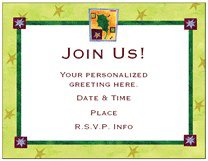
Everything was easy to follow and navigation from screen to screen was very straightforward so I didn't feel lost halfway through the process.
Each step was clearly marked from beginning to end, unlike some other services I have used.
If you don't want to completely design everything yourself, you can use one of their templates (like the one above) and just fill in the wording, like "Time of Party" "Date" and so forth. Steps are as follows:
- Select a template
- Add your content--front of the invitation and inside
- Proof your invitation and initial
- Specify quantity
- Billing and shipping information
- Shipment arrives, you address and mail
Special Limited Time Offers at VistaPrint.com
- 50% Off Custom Printed Invitations & Announcements
- Buy More, Save More Holiday Sale! $5 off $25, $15 off $50, $40 off $100
Once you arrive on this screen, choose the category you prefer ("Birthday" "Christmas" or whatever), choose the template and then proceed with the other steps.
Email Invitations Start Here
One of the easiest ways to design invitations and get them out quickly is to use Evite for your guests who are on email.
I am warning you now. Once you begin using Evite, you may never go back to traditional invitations again. On-line invitations are perfect for our busy lifestyles and can be used for almost any occasion, except more formal affairs. The process:
- Choose from hundreds of designs, or design your own. Include party details like date, time and even a map! If you would like your guests to bring something, like a bottle of wine, be specific in the invitation. Something like, "Please bring your favorite bottle of wine. Price limit $15.00."
- Import contacts from your email address book
- Your guests receive an email to view your invitation on Evite
- View your guests responses on Evite -- This is the coolest thing! As people respond, Evite keeps track of responses, including personalized messages, like "Looking forward to the Fondue Party. What can I bring?"
Seriously, what could be easier? Click here to design Christmas invitations using Evite now.
Powerpoint Invitations Start Here
I especially love the ease of creating mass amounts of free Christmas invitations very easily using Microsoft Powerpoint.
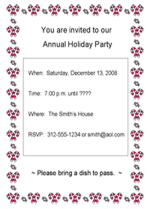
When I am in a pinch, I can not afford to waste time hand addressing invitations or waiting for them to come in the mail. I taught myself how to create very basic free invitations in Powerpoint and I use this method at least once a year.
To learn how to create free Christmas invitations in Powerpoint, click here to go to my Design Powerpoint Invitations page. You will find detailed instructions with a video and screen shots to help you along.
Labels Start Here
If you plan on sending your invitations through the mail, the easiest way to get them addressed is to create address labels in Microsoft Word.
Go to this page to learn how to Create Address Labels in Microsoft Word. Look for the link at the top of the page to go directly to that section.
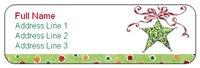
Once you get your invitations in the envelopes with the address labels attached, make sure you have a return address in the upper left corner of every envelope. Each year I get a few holiday letters and Christmas party invitations back in the mail because, for whatever reason, they were undeliverable.
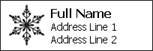
Choose either Return Address Labels like the one above or use a Self-Inking Rubber Stamp
like the one to the right to make
this job a snap.
VistaPrint.com is my chosen vendor for both as they have several Christmas designs to choose from and they offer special pricing on certain products and shipping expenses.
Special Limited Time Offers at VistaPrint.com
- 50% Off Custom Printed Invitations & Announcements
- Buy More, Save More Holiday Sale! $5 off $25, $15 off $50, $40 off $100
Other Christmas Pages You Might Like
 |
Party Decoration Depending on the type of party you are having, I have found that you can either go nuts with the party decorations or you can really keep it simple and still show off your home with subtle, classy style. Either way, you'll find great Christmas party ideas here for how to do it right. |
|
Party Recipes Ah...recipes. My favorite part of party planning. I've gathered some of my favorite party recipes for you that are sure to delight all of your guests. I am not called the Theme Party Queen for nothing! |
|
Holiday Table Centerpieces Create your own Holiday Table Centerpieces with simple craft items and things you already have around your home. Ideas for holiday decorations, theme centerpieces or budget wedding centerpieces. |
|
Party Music This is my husband's area of expertise. In my opinion, the party music sets the tone for the whole evening. Have you ever been to a party where the music really didn't fit the theme or the age of the crowd? It's really kind of a downer. Compare that to a party where the music is well thought out and never ending. The party is in full swing the whole night! Find some suggestions here on how to do it right. |
|
Costumes & Attire This section has ideas ranging from full blown party costumes, like dressing up in a Santa suit, to the more subtle things that you can add to your attire, like wearing a funny T-shirt or hat. Find lots of great ideas here. |
|
Fun Party Games This selection of Christmas party games includes options for all age groups. Some are perfect for kids holiday school parties while others work well for large adult parties at home and office. |

|

|

|

|




Thoughts? Questions? Opinions?
Have your say about what you just read! Leave me a comment in the box below.